The label
Glyco Reset Supplement Facts: What the Bottle Label Shows
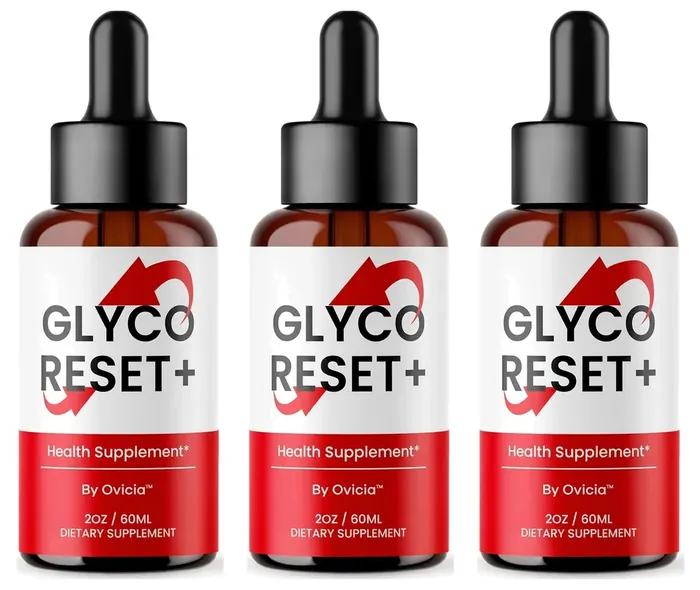
The Glyco Reset front label shows GLYCO RESET+, By Ovicia, 2OZ / 60ML and Dietary Supplement.
For serving size, servings per bottle and sugar grams, check the back of your bottle, since FDA labeling rules require most of these (FDA Labeling Guide Ch. IV).
See how to take it.
Written by the Glyco Reset editorial teamUpdated
The front
What does the front of the Glyco Reset label say?
Five short lines: the name, one claim, the company, the size and the product type. Word for word, it reads GLYCO RESET+ · Health Supplement* · By Ovicia · 2OZ / 60ML · DIETARY SUPPLEMENT.
The numbered dots match the notes below the photo. Start with number 4, the asterisk, because it changes how to read the only claim on the bottle.
Tap a number to see what that part of the label says.
- Dropper top
A glass dropper measures each serving. The brand's graphic says to take the recommended serving as directed on the label.
- Amber glass
A small brown glass bottle. The front shows no lot number or best-before date; look on the base or back of yours.
- GLYCO RESET+
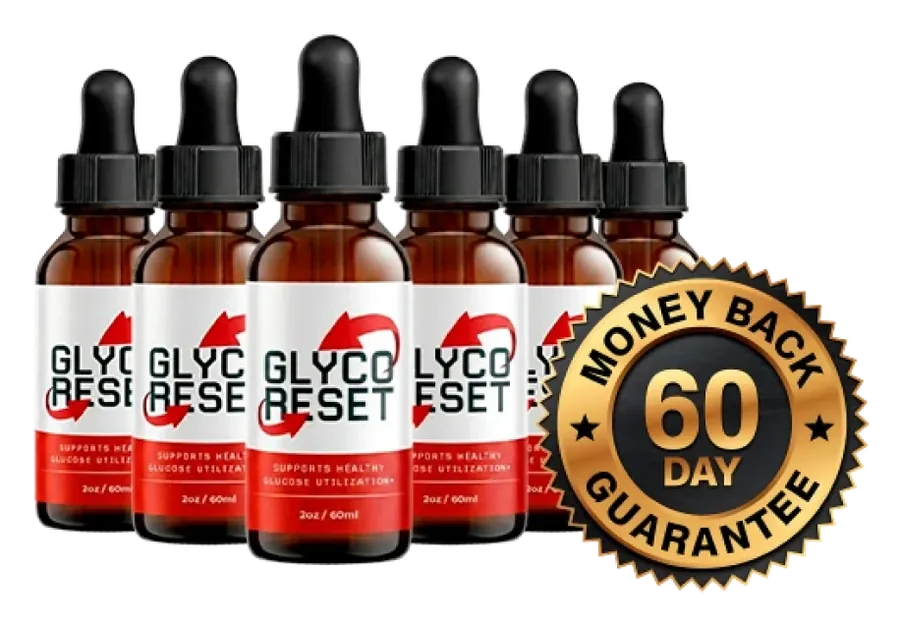
The name on most photos has a plus sign. An older pack photo shows "Glyco Reset" without it, with the line "Supports healthy glucose utilization*".
- Health Supplement*
The asterisk points to the FDA statement: the claim has not been evaluated by the FDA, and the product is not meant to treat any disease.
- By Ovicia
The only company named on the front. No address or phone appears in any photo we have.
- 2OZ / 60ML
The whole bottle holds 60 mL of liquid. That is 2 to 4 days of the vinegar amount used in trials, even if it were all vinegar.
- Dietary supplement
Sold as a supplement, so the FDA did not review it before sale. The Supplement Facts panel, with the serving and sugar, should be on the back.
The claim
What does "Health Supplement*" mean on the Glyco Reset bottle?
It is a general wellness line, not a health promise. The asterisk sends you to the standard notice that FDA has not evaluated the statement. Supplements may describe support for normal body function, but only drugs may claim to treat or prevent a disease (FDA: Structure/Function Claims).
The brand's graphics reach further than the bottle, with a line about "healthy glucose utilization*" and another about healthy blood sugar levels. Both are the brand's words, under the same notice:
*These statements have not been evaluated by the Food and Drug Administration. This product is not intended to diagnose, treat, cure, or prevent any disease.
An older pack photo shows a front reading "GLYCO RESET" without the plus sign, with "SUPPORTS HEALTHY GLUCOSE UTILIZATION*" under the name. The newer front drops that line. Our Glyco Reset benefits page weighs each brand claim against the research.
Typed out
What else can you read on the Glyco Reset label photos?
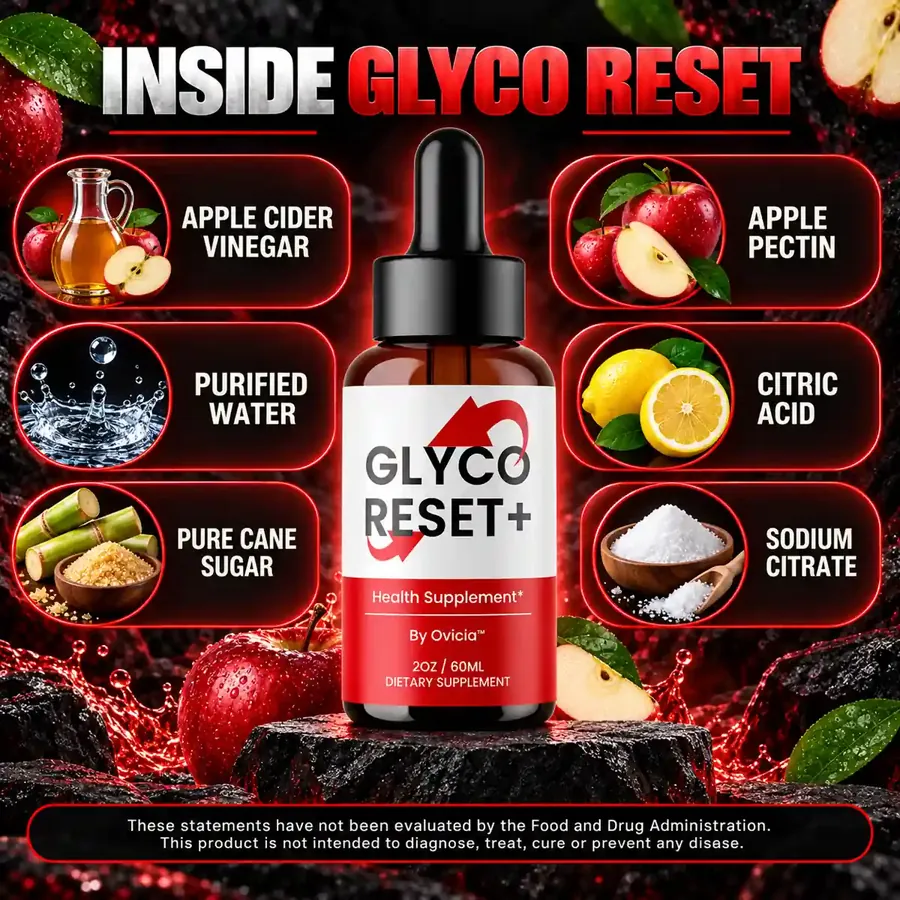
The ingredient names, a short direction and the company name, and little else. The brand's ingredient graphic is below, followed by every readable line typed into a table.
| Front of the bottle | GLYCO RESET+ · Health Supplement* · By Ovicia™ · 2OZ / 60ML · DIETARY SUPPLEMENT |
|---|---|
| Older front design | GLYCO RESET · SUPPORTS HEALTHY GLUCOSE UTILIZATION* · 2oz / 60ml (one pack photo) |
| Ingredients named by the brand | Apple Cider Vinegar, Purified Water, Pure Cane Sugar, Apple Pectin, Citric Acid, Sodium Citrate |
| Serving size | Not shown in any photo we have |
| Servings per container | Not shown in any photo we have |
| Amounts and sugar grams | Not shown in any photo we have |
| Directions | Brand graphic: "Use the dropper to take the recommended serving as directed on the label." |
| FDA statement | These statements have not been evaluated by the Food and Drug Administration. This product is not intended to diagnose, treat, cure or prevent any disease. |
| Company | By Ovicia (no address or phone shown) |
| Lot and best-before | Not shown in our photos |
The only direction points back to a label we have not seen. Safe use, diluted in water, is on the how to use Glyco Reset page.
The law
What must a Supplement Facts panel show by FDA rules?
Three things come first: how big one serving is, how many servings the container holds, and how much of each dietary ingredient is inside. FDA's labeling guide adds that calories, total carbohydrate and sugars must be listed when present in measurable amounts (FDA Labeling Guide Ch. IV). The label must also name the company and its place of business (FDA: Q&A on Dietary Supplements).
| Required item | Why it matters | In our photos? |
|---|---|---|
| Serving size | Tells you how much is one dose | Not published |
| Servings per container | Tells you how long a bottle lasts | Not published |
| Amount of each ingredient | Lets you compare with research doses | Not published |
| Calories, carbohydrate, sugars | Cane sugar is in it, so a sugars line is expected | Not published |
| Net quantity | The amount in the bottle | 2OZ / 60ML |
| Company name | Who stands behind the product | By Ovicia |
| Place of business | Where to write or send a complaint | Not published |
| Contact for bad reactions | A U.S. address or phone for adverse event reports | Not published |
Missing from a photo is not the same as missing from the bottle. Most of these items belong on the back or side, which no photo shows.
The gaps
What is missing from every Glyco Reset label photo?
Six details. Without them, no one can say how much vinegar or sugar you get per dropper.
Serving size
The dropper is the measure, but the photos never say how many mL or droppers make a serving.
Servings per bottle
Without this, nobody can say how many days a bottle lasts. We do not guess.
Ingredient amounts
Six names, zero numbers. The Glyco Reset ingredients page shows why the vinegar is still far below trial doses.
Sugar grams
Cane sugar is third on the list. The grams matter most to people who count carbohydrates.
Company address
The front names only Ovicia. The address should be printed on the back.
Lot code and best-before
A lot code ties your bottle to its production records. Look on the base.
Your bottle
How do you read the back of your own Glyco Reset bottle?
Turn the bottle and look for a box titled "Supplement Facts". Then check these four things, and note anything you cannot find.
Serving and servings
Note the serving in mL or droppers, and the servings per container. Divide to see how many days the bottle covers.
Calories and sugars
Find total carbohydrate and sugars per serving. If you count carbs, add that figure to your log for each serving.
Name and address
Check that a full street address and a phone or website appear next to the company name.
Lot and date
Find the lot code and best-before date, often printed on the base. Write both down before you open the bottle.
If the back of your bottle has no Supplement Facts panel at all, do not take it. Call the order desk at +1 (302) 200-3480 and see the Glyco Reset batch check steps.
Two designs
Is Glyco Reset+ the same product as the older Glyco Reset label?
We believe so, but cannot confirm it. The older pack photo shows the same amber dropper bottle and the same 2oz / 60ml size, with a different front and no plus sign.
No photo of either design shows the back panel. So nobody outside the company can compare the two formulas line by line. If you receive the older design, read its back label as carefully as the newer one.
Bottom line
Does the Glyco Reset label tell you enough?
Not from the photos alone. The front is modest and honest about being a supplement, but every number that matters sits on a panel no photo shows.
What the label gets right
- A modest front claim with an asterisk
- Net size printed: 2 oz (60 mL)
- Six plain ingredient names
What the photos leave out
- Serving size and servings per bottle
- Amounts and sugar grams
- Address, lot code and best-before
A label is not a treatment plan. If you live with diabetes, keep your medicine and your usual checks exactly as your doctor set them.
FAQ
Glyco Reset label FAQ
Where is the Supplement Facts panel on Glyco Reset?
It should be on the back or side of the bottle. None of the Glyco Reset photos we have shows that side, so we cannot confirm what it says. Read the panel on your own bottle before the first serving, and keep the bottle if anything looks wrong.
What is the serving size of Glyco Reset?
The Glyco Reset serving size is not shown in any photo we have. A brand graphic says only to use the dropper to take the recommended serving as directed on the label. Follow the serving printed on your bottle and stir it into water.
What does the asterisk on the Glyco Reset label mean?
The asterisk after "Health Supplement" points to the standard FDA notice. It says the statement has not been evaluated by the Food and Drug Administration, and the product is not intended to diagnose, treat or prevent any disease.
Why does the Glyco Reset label not show an address?
The front of the Glyco Reset bottle names only Ovicia, and no photo shows the back. FDA rules require the company's name and place of business on the label, so look for the address on the back of your bottle.
How many calories are in Glyco Reset drops?
No photo shows a Supplement Facts panel, so nobody can give a calorie figure yet. FDA rules call for calories and sugars when present in measurable amounts, and cane sugar is an ingredient. Check the panel on your bottle for the figure per serving.
Is Glyco Reset+ different from Glyco Reset?
They appear to be two front designs of the same 2 oz dropper bottle. Only the front wording differs in the photos: a plus sign and "Health Supplement*" on the newer bottle, the glucose utilization line on the older one. No photo shows either back panel, so the formulas cannot be compared.
Who wrote this
Written and reviewed by
Plain-language pages built from the bottle label, the order page and linked public health sources such as NIH, FDA and CDC.
Last updated . Read our editorial standards and how we check reviews. This website is run by a U.S. stocking partner for Glyco Reset, not by the manufacturer. We earn money when you buy through our order links.
Keep reading
More about Glyco Reset
Ingredients
All six Glyco Reset ingredients, the bottle math against trial doses, and why sugar sits third on the list.
Read more
Batch verify
What the Glyco Reset lot and CoA codes can and cannot prove, plus four checks for a bottle on arrival.
Read more
Testing & quality
Which Glyco Reset quality claims can be checked, what each badge means, and how to ask for a real lab report.
Read moreU.S. stocking partner for Glyco Reset
Ready to try Glyco Reset?
Pick 1, 3 or 6 bottles on the official order page. It shows the price, shipping and total before you pay.
- Official order page
- 60-day money-back window
- Tracked shipping